FlowCraft
An open-source visual AI workflow builder for designing, testing,
and deploying multi-agent workflows without platform lock-in.
Try FlowCraft
FlowCraft — Product Design Case Study
The Problem
AI tools are powerful but fragmented. Users juggle ChatGPT for text, DALL-E for images, manual copy-paste between tools, and lose context at every step. Building multi-step AI workflows — extract knowledge from a PDF, generate a LinkedIn post from it, create a hero image — requires developer-level orchestration or expensive no-code platforms with steep learning curves.
The gap: There's no lightweight, visual tool that lets non-technical users chain AI operations together and run them in one click.
The Product
FlowCraft is a browser-based visual AI workflow builder. Users drag nodes onto a canvas, connect them left-to-right, and hit Run. The entire workflow executes in sequence — streaming LLM output in real time, animating data flow across edges, and rendering the final result with markdown formatting.
Core principle: Everything happens in the browser. No accounts, no backend database, no data leaves the client except direct API calls to the user's own LLM provider.
Design Decisions
Dark-Only, Tool-Grade UI
Inspired by Linear, Figma, and Raycast. A near-black background (#09090b) with high-contrast text and indigo (#6366f1) as the primary accent. The decision to skip light mode was intentional — this is a focused workspace, not a content site. Every pixel of contrast budget goes toward making nodes, connections, and status states readable at a glance.
Per-Node Color Identity
Each node type owns a hue, applied consistently across the toolbar icon, node header badge, inspector panel, and empty-state preview:
Node Hue Purpose Input Blue Data entry — file upload or text Knowledge Violet Structured extraction via LLM AI Prompt Amber Freeform LLM generation Image Gen Pink DALL-E image generation Output Emerald Terminal result display
This creates instant recognition without reading labels. Users learn the color language within minutes.
Status as Visual Language
Node states drive three simultaneous visual channels:
Border color — indigo (running), green (success), red (error)
Glow shadow — 20-30% opacity halo matching the status color
Badge — animated spinner, checkmark, or X icon
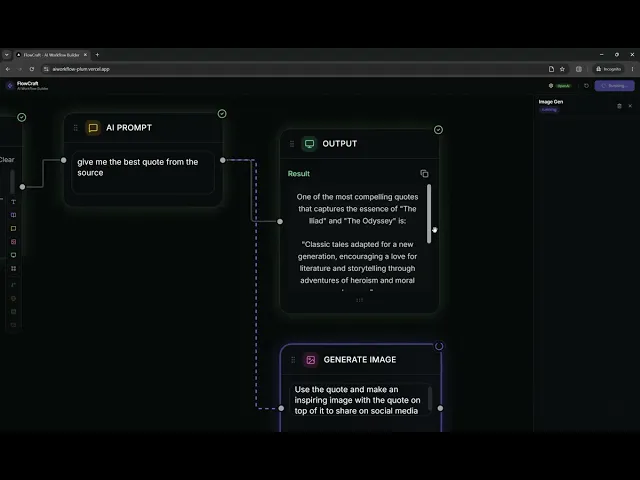
The running state also triggers a shimmer gradient sweep across the node face, and connected edges animate with a dashing stroke. Users always know what's happening and where.
Streaming as First-Class UX
When a Prompt node executes, tokens stream into the node in real time with a blinking cursor. This isn't a progress bar — it's the actual output appearing character by character. Users get immediate confidence that the AI is working and can assess output quality before execution even finishes.
Left-to-Right Flow
Handles are positioned left (input) and right (output), enforcing a natural reading direction. The connection hit area is 12px visible + 8px invisible padding, solving the common React Flow pain point of tiny, hard-to-click handles.
Architecture
Local-First, Privacy-First
API keys stored in
localStorage, never persisted server-sidePDF parsing happens client-side via
pdfjs-dist— documents never leave the browserNext.js API routes act as thin proxies, forwarding requests directly to provider APIs
Workflow state (nodes, edges, config) persists via Zustand + localStorage
Multi-Provider LLM Support
Five providers via Vercel AI SDK: OpenAI, Anthropic, Google Gemini, Groq, OpenRouter. Users bring their own key and switch providers without rebuilding workflows.
Execution Engine
A topological sort algorithm determines execution order, enforces DAG structure, and detects cycles. Nodes execute sequentially — each node receives upstream outputs as context. Edge animations trace data flow in real time.
Interaction Design Details
Feature Implementation Undo/Redo 30-level history via Zustand temporal middleware. Ctrl+Z / Ctrl+Shift+Z. Node Duplication Ctrl+D or copy button in inspector. Clones config, resets status. Node Notes Sticky note icon in header. Amber-tinted textarea, persisted with workflow. Frame Grouping Resizable dashed container. Drag a node in to parent it; drag out to unparent. Output Resize Bottom grip handle on output node — drag to expand/collapse result area. Markdown Output Results render with headings, bold, lists, code blocks, blockquotes. Editable Title Inline-editable workflow name in header, persisted to localStorage. Micro-interactions Spring physics on node entry, scale on button press, staggered modal animations.
Tech Stack
Layer Technology Framework Next.js 16 (App Router) Canvas React Flow (@xyflow/react v12) State Zustand + zundo (temporal) + persist AI SDK Vercel AI SDK (streamText, generateObject) Animations Framer Motion Styling Tailwind CSS v4 + Radix UI primitives Icons Lucide React
Competitive Landscape
Product Positioning FlowCraft Differentiator Relay.app Visual AI workflow builder, hosted FlowCraft is open-source, local-first, no account required Langflow Python-based LLM flow builder FlowCraft runs entirely in-browser, no Python/Docker setup Flowise Drag-and-drop LLM chain builder FlowCraft has a more polished consumer-grade UI n8n General automation platform FlowCraft is AI-native, not a general automation tool Dify AI app development platform FlowCraft is simpler — workflows, not full app development ChatGPT / Claude Single-turn AI chat FlowCraft chains multiple AI steps into reproducible workflows
Positioning: FlowCraft sits between "chat with AI" and "build an AI app." It's for users who want multi-step AI automation without writing code or managing infrastructure.
Current Scope
Shipped
5 functional node types (Input, Knowledge, Prompt, Image Gen, Output)
Frame node for visual grouping
Multi-provider LLM support (5 providers)
Real-time streaming execution with status visualization
Undo/redo, duplication, node notes
Markdown rendering in output
Client-side PDF/text parsing
First-run onboarding modal
Workflow persistence in localStorage
Keyboard shortcuts (Ctrl+Z, Ctrl+Shift+Z, Ctrl+D, Delete)
Designed but Not Yet Built (Coming Soon)
Condition node — Branch workflows based on output content
Web Scraper node — Pull content from URLs (API route already exists)
Memory node — Persist data between workflow runs
Email node — Send workflow output via email
Future Scope
Near-Term (Low Effort)
Export/Import — Download workflows as
.flowJSON files, share with othersTemplate gallery — Pre-built workflows (blog generator, content repurposer, Q&A bot)
Prompt variables —
{{input}}placeholders that auto-fill from upstream nodesRun history — Log of past executions with timestamps and outputs
Cost estimator — Token count + estimated cost shown before running
Medium-Term
Collaboration — Share workflows via URL, real-time multiplayer editing
Custom code node — JavaScript/Python execution within the workflow
Webhook triggers — HTTP endpoint that triggers workflow execution
Branching + loops — Conditional paths and iteration over lists
Cloud sync — Optional account-based persistence (Supabase/Firebase)
Long-Term Vision
Marketplace — Community-shared workflow templates
Agents — Autonomous multi-step execution with tool use
API mode — Deploy workflows as API endpoints
Mobile canvas — Touch-optimized workflow building
Key Metrics to Track
Metric What It Measures Workflows created per session Engagement depth Nodes per workflow Complexity adoption Run success rate Reliability Provider distribution Market signal for integrations Template vs. custom starts Onboarding effectiveness Undo frequency Iteration comfort Return sessions (localStorage) Retention signal
Design Takeaways
Color as information architecture. When every node type has a distinct hue, users navigate by color, not labels. This scales better than text.
Animation as feedback, not decoration. Every animation in FlowCraft communicates state: shimmer = processing, dash = data flowing, spring = something appeared. Zero purely decorative motion.
Local-first builds trust. The "your keys never leave your browser" message with a shield icon isn't just a feature — it's a trust signal that removes the biggest friction to trying the product.
Streaming turns waiting into watching. Showing tokens arrive in real time converts a 5-second wait into an engaging experience. Users read along instead of wondering if it's broken.
Constraints enable simplicity. Dark-only theme, left-to-right flow, DAG-only execution. Each constraint eliminated a class of design decisions and kept the product focused.
FlowCraft — Build AI workflows visually. No code. No accounts. Your browser is the platform.
FlowCraft — Product Design Case Study
The Problem
AI tools are powerful but fragmented. Users juggle ChatGPT for text, DALL-E for images, manual copy-paste between tools, and lose context at every step. Building multi-step AI workflows — extract knowledge from a PDF, generate a LinkedIn post from it, create a hero image — requires developer-level orchestration or expensive no-code platforms with steep learning curves.
The gap: There's no lightweight, visual tool that lets non-technical users chain AI operations together and run them in one click.
The Product
FlowCraft is a browser-based visual AI workflow builder. Users drag nodes onto a canvas, connect them left-to-right, and hit Run. The entire workflow executes in sequence — streaming LLM output in real time, animating data flow across edges, and rendering the final result with markdown formatting.
Core principle: Everything happens in the browser. No accounts, no backend database, no data leaves the client except direct API calls to the user's own LLM provider.
Design Decisions
Dark-Only, Tool-Grade UI
Inspired by Linear, Figma, and Raycast. A near-black background (#09090b) with high-contrast text and indigo (#6366f1) as the primary accent. The decision to skip light mode was intentional — this is a focused workspace, not a content site. Every pixel of contrast budget goes toward making nodes, connections, and status states readable at a glance.
Per-Node Color Identity
Each node type owns a hue, applied consistently across the toolbar icon, node header badge, inspector panel, and empty-state preview:
Input (Blue): Data entry through text input or file upload.
Knowledge (Violet): Extracts and structures information using an LLM.
AI Prompt (Amber): Generates freeform responses using an LLM.
Image Gen (Pink): Creates images using DALL·E.
Output (Emerald): Displays the final result or output.
This creates instant recognition without reading labels. Users learn the color language within minutes.
Status as Visual Language
Node states drive three simultaneous visual channels:
Border color — indigo (running), green (success), red (error)
Glow shadow — 20-30% opacity halo matching the status color
Badge — animated spinner, checkmark, or X icon
The running state also triggers a shimmer gradient sweep across the node face, and connected edges animate with a dashing stroke. Users always know what's happening and where.
Streaming as First-Class UX
When a Prompt node executes, tokens stream into the node in real time with a blinking cursor. This isn't a progress bar — it's the actual output appearing character by character. Users get immediate confidence that the AI is working and can assess output quality before execution even finishes.
Left-to-Right Flow
Handles are positioned left (input) and right (output), enforcing a natural reading direction. The connection hit area is 12px visible + 8px invisible padding, solving the common React Flow pain point of tiny, hard-to-click handles.
Architecture
Local-First, Privacy-First
API keys stored in
localStorage, never persisted server-sidePDF parsing happens client-side via
pdfjs-dist— documents never leave the browserNext.js API routes act as thin proxies, forwarding requests directly to provider APIs
Workflow state (nodes, edges, config) persists via Zustand + localStorage
Multi-Provider LLM Support
Five providers via Vercel AI SDK: OpenAI, Anthropic, Google Gemini, Groq, OpenRouter. Users bring their own key and switch providers without rebuilding workflows.
Execution Engine
A topological sort algorithm determines execution order, enforces DAG structure, and detects cycles. Nodes execute sequentially — each node receives upstream outputs as context. Edge animations trace data flow in real time.
Interaction Design Details
Feature Implementation
Undo/Redo 30-level history via Zustand temporal middleware. Ctrl+Z / Ctrl+Shift+Z.
Node Duplication Ctrl+D or copy button in inspector. Clones config, resets status.
Node Notes Sticky note icon in header. Amber-tinted textarea, persisted with workflow.
Frame Grouping Resizable dashed container. Drag a node in to parent it; drag out to unparent.
Output Resize Bottom grip handle on output node — drag to expand/collapse result area.
Markdown Output Results render with headings, bold, lists, code blocks, blockquotes.
Editable Title Inline-editable workflow name in header, persisted to localStorage.
Micro-interactions Spring physics on node entry, scale on button press, staggered modal animations.
Tech Stack
Layer Technology Framework Next.js 16 (App Router) Canvas React Flow (@xyflow/react v12) State Zustand + zundo (temporal) + persist AI SDK Vercel AI SDK (streamText, generateObject) Animations Framer Motion Styling Tailwind CSS v4 + Radix UI primitives Icons Lucide React
Competitive Landscape
Product Positioning FlowCraft Differentiator
Relay.app Visual AI workflow builder, hosted FlowCraft is open-source, local-first, no account required
Langflow Python-based LLM flow builder FlowCraft runs entirely in-browser, no Python/Docker setup
Flowise Drag-and-drop LLM chain builder FlowCraft has a more polished consumer-grade UI
n8n General automation platform FlowCraft is AI-native, not a general automation tool
Dify AI app development platform FlowCraft is simpler — workflows, not full app development
ChatGPT / Claude Single-turn AI chat FlowCraft chains multiple AI steps into reproducible workflows
Positioning: FlowCraft sits between "chat with AI" and "build an AI app." It's for users who want multi-step AI automation without writing code or managing infrastructure.
Current Scope
Shipped
5 functional node types (Input, Knowledge, Prompt, Image Gen, Output)
Frame node for visual grouping
Multi-provider LLM support (5 providers)
Real-time streaming execution with status visualization
Undo/redo, duplication, node notes
Markdown rendering in output
Client-side PDF/text parsing
First-run onboarding modal
Workflow persistence in localStorage
Keyboard shortcuts (Ctrl+Z, Ctrl+Shift+Z, Ctrl+D, Delete)
Designed but Not Yet Built (Coming Soon)
Condition node — Branch workflows based on output content
Web Scraper node — Pull content from URLs (API route already exists)
Memory node — Persist data between workflow runs
Email node — Send workflow output via email
Future Scope
Near-Term (Low Effort)
Export/Import — Download workflows as
.flowJSON files, share with othersTemplate gallery — Pre-built workflows (blog generator, content repurposer, Q&A bot)
Prompt variables —
{{input}}placeholders that auto-fill from upstream nodesRun history — Log of past executions with timestamps and outputs
Cost estimator — Token count + estimated cost shown before running
Medium-Term
Collaboration — Share workflows via URL, real-time multiplayer editing
Custom code node — JavaScript/Python execution within the workflow
Webhook triggers — HTTP endpoint that triggers workflow execution
Branching + loops — Conditional paths and iteration over lists
Cloud sync — Optional account-based persistence (Supabase/Firebase)
Long-Term Vision
Marketplace — Community-shared workflow templates
Agents — Autonomous multi-step execution with tool use
API mode — Deploy workflows as API endpoints
Mobile canvas — Touch-optimized workflow building
Key Metrics to Track
Metric What It Measures Workflows created per session Engagement depth Nodes per workflow Complexity adoption Run success rate Reliability Provider distribution Market signal for integrations Template vs. custom starts Onboarding effectiveness Undo frequency Iteration comfort Return sessions (localStorage) Retention signal
Design Takeaways
Color as information architecture. When every node type has a distinct hue, users navigate by color, not labels. This scales better than text.
Animation as feedback, not decoration. Every animation in FlowCraft communicates state: shimmer = processing, dash = data flowing, spring = something appeared. Zero purely decorative motion.
Local-first builds trust. The "your keys never leave your browser" message with a shield icon isn't just a feature — it's a trust signal that removes the biggest friction to trying the product.
Streaming turns waiting into watching. Showing tokens arrive in real time converts a 5-second wait into an engaging experience. Users read along instead of wondering if it's broken.
Constraints enable simplicity. Dark-only theme, left-to-right flow, DAG-only execution. Each constraint eliminated a class of design decisions and kept the product focused.
FlowCraft — Build AI workflows visually. No code. No accounts. Your browser is the platform.
FlowCraft — Product Design Case Study
The Problem
AI tools are powerful but fragmented. Users juggle ChatGPT for text, DALL-E for images, manual copy-paste between tools, and lose context at every step. Building multi-step AI workflows — extract knowledge from a PDF, generate a LinkedIn post from it, create a hero image — requires developer-level orchestration or expensive no-code platforms with steep learning curves.
The gap: There's no lightweight, visual tool that lets non-technical users chain AI operations together and run them in one click.
The Product
FlowCraft is a browser-based visual AI workflow builder. Users drag nodes onto a canvas, connect them left-to-right, and hit Run. The entire workflow executes in sequence — streaming LLM output in real time, animating data flow across edges, and rendering the final result with markdown formatting.
Core principle: Everything happens in the browser. No accounts, no backend database, no data leaves the client except direct API calls to the user's own LLM provider.
Design Decisions
Dark-Only, Tool-Grade UI
Inspired by Linear, Figma, and Raycast. A near-black background (#09090b) with high-contrast text and indigo (#6366f1) as the primary accent. The decision to skip light mode was intentional — this is a focused workspace, not a content site. Every pixel of contrast budget goes toward making nodes, connections, and status states readable at a glance.
Per-Node Color Identity
Each node type owns a hue, applied consistently across the toolbar icon, node header badge, inspector panel, and empty-state preview:
Input (Blue): Data entry through text input or file upload.
Knowledge (Violet): Extracts and structures information using an LLM.
AI Prompt (Amber): Generates freeform responses using an LLM.
Image Gen (Pink): Creates images using DALL·E.
Output (Emerald): Displays the final result or output.
This creates instant recognition without reading labels. Users learn the color language within minutes.
Status as Visual Language
Node states drive three simultaneous visual channels:
Border color — indigo (running), green (success), red (error)
Glow shadow — 20-30% opacity halo matching the status color
Badge — animated spinner, checkmark, or X icon
The running state also triggers a shimmer gradient sweep across the node face, and connected edges animate with a dashing stroke. Users always know what's happening and where.
Streaming as First-Class UX
When a Prompt node executes, tokens stream into the node in real time with a blinking cursor. This isn't a progress bar — it's the actual output appearing character by character. Users get immediate confidence that the AI is working and can assess output quality before execution even finishes.
Left-to-Right Flow
Handles are positioned left (input) and right (output), enforcing a natural reading direction. The connection hit area is 12px visible + 8px invisible padding, solving the common React Flow pain point of tiny, hard-to-click handles.
Architecture
Local-First, Privacy-First
API keys stored in
localStorage, never persisted server-sidePDF parsing happens client-side via
pdfjs-dist— documents never leave the browserNext.js API routes act as thin proxies, forwarding requests directly to provider APIs
Workflow state (nodes, edges, config) persists via Zustand + localStorage
Multi-Provider LLM Support
Five providers via Vercel AI SDK: OpenAI, Anthropic, Google Gemini, Groq, OpenRouter. Users bring their own key and switch providers without rebuilding workflows.
Execution Engine
A topological sort algorithm determines execution order, enforces DAG structure, and detects cycles. Nodes execute sequentially — each node receives upstream outputs as context. Edge animations trace data flow in real time.
Interaction Design Details
Feature Implementation
Undo/Redo 30-level history via Zustand temporal middleware. Ctrl+Z / Ctrl+Shift+Z.
Node Duplication Ctrl+D or copy button in inspector. Clones config, resets status.
Node Notes Sticky note icon in header. Amber-tinted textarea, persisted with workflow.
Frame Grouping Resizable dashed container. Drag a node in to parent it; drag out to unparent.
Output Resize Bottom grip handle on output node — drag to expand/collapse result area.
Markdown Output Results render with headings, bold, lists, code blocks, blockquotes.
Editable Title Inline-editable workflow name in header, persisted to localStorage.
Micro-interactions Spring physics on node entry, scale on button press, staggered modal animations.
Tech Stack
Layer Technology Framework Next.js 16 (App Router) Canvas React Flow (@xyflow/react v12) State Zustand + zundo (temporal) + persist AI SDK Vercel AI SDK (streamText, generateObject) Animations Framer Motion Styling Tailwind CSS v4 + Radix UI primitives Icons Lucide React
Competitive Landscape
Product Positioning FlowCraft Differentiator
Relay.app Visual AI workflow builder, hosted FlowCraft is open-source, local-first, no account required
Langflow Python-based LLM flow builder FlowCraft runs entirely in-browser, no Python/Docker setup
Flowise Drag-and-drop LLM chain builder FlowCraft has a more polished consumer-grade UI
n8n General automation platform FlowCraft is AI-native, not a general automation tool
Dify AI app development platform FlowCraft is simpler — workflows, not full app development
ChatGPT / Claude Single-turn AI chat FlowCraft chains multiple AI steps into reproducible workflows
Positioning: FlowCraft sits between "chat with AI" and "build an AI app." It's for users who want multi-step AI automation without writing code or managing infrastructure.
Current Scope
Shipped
5 functional node types (Input, Knowledge, Prompt, Image Gen, Output)
Frame node for visual grouping
Multi-provider LLM support (5 providers)
Real-time streaming execution with status visualization
Undo/redo, duplication, node notes
Markdown rendering in output
Client-side PDF/text parsing
First-run onboarding modal
Workflow persistence in localStorage
Keyboard shortcuts (Ctrl+Z, Ctrl+Shift+Z, Ctrl+D, Delete)
Designed but Not Yet Built (Coming Soon)
Condition node — Branch workflows based on output content
Web Scraper node — Pull content from URLs (API route already exists)
Memory node — Persist data between workflow runs
Email node — Send workflow output via email
Future Scope
Near-Term (Low Effort)
Export/Import — Download workflows as
.flowJSON files, share with othersTemplate gallery — Pre-built workflows (blog generator, content repurposer, Q&A bot)
Prompt variables —
{{input}}placeholders that auto-fill from upstream nodesRun history — Log of past executions with timestamps and outputs
Cost estimator — Token count + estimated cost shown before running
Medium-Term
Collaboration — Share workflows via URL, real-time multiplayer editing
Custom code node — JavaScript/Python execution within the workflow
Webhook triggers — HTTP endpoint that triggers workflow execution
Branching + loops — Conditional paths and iteration over lists
Cloud sync — Optional account-based persistence (Supabase/Firebase)
Long-Term Vision
Marketplace — Community-shared workflow templates
Agents — Autonomous multi-step execution with tool use
API mode — Deploy workflows as API endpoints
Mobile canvas — Touch-optimized workflow building
Key Metrics to Track
Metric What It Measures Workflows created per session Engagement depth Nodes per workflow Complexity adoption Run success rate Reliability Provider distribution Market signal for integrations Template vs. custom starts Onboarding effectiveness Undo frequency Iteration comfort Return sessions (localStorage) Retention signal
Design Takeaways
Color as information architecture. When every node type has a distinct hue, users navigate by color, not labels. This scales better than text.
Animation as feedback, not decoration. Every animation in FlowCraft communicates state: shimmer = processing, dash = data flowing, spring = something appeared. Zero purely decorative motion.
Local-first builds trust. The "your keys never leave your browser" message with a shield icon isn't just a feature — it's a trust signal that removes the biggest friction to trying the product.
Streaming turns waiting into watching. Showing tokens arrive in real time converts a 5-second wait into an engaging experience. Users read along instead of wondering if it's broken.
Constraints enable simplicity. Dark-only theme, left-to-right flow, DAG-only execution. Each constraint eliminated a class of design decisions and kept the product focused.
FlowCraft — Build AI workflows visually. No code. No accounts. Your browser is the platform.
Select this text to see the highlight effect